
You’ve probably tried ChatGPT event planning prompts before. You get a nice checklist and some cute invite wording.
Then you still have to build the invite, collect RSVPs and chase people who didn’t answer.
These prompts go one step further. Connect ChatGPT to Mixily (free, about a minute) and each prompt below makes a real RSVP page your guests can open. Copy them, swap in your details, done.
Before You Start: Connect ChatGPT to Mixily
- In ChatGPT, open Plugins in the left sidebar, click Add, then Add custom MCP server.
- Name it Mixily and paste this as the server URL: https://mcp.mixily.com. Leave authentication on OAuth.
- Tick I understand and want to continue, click Create as a plugin, then Connect Mixily.
- Sign in to Mixily and click Allow.
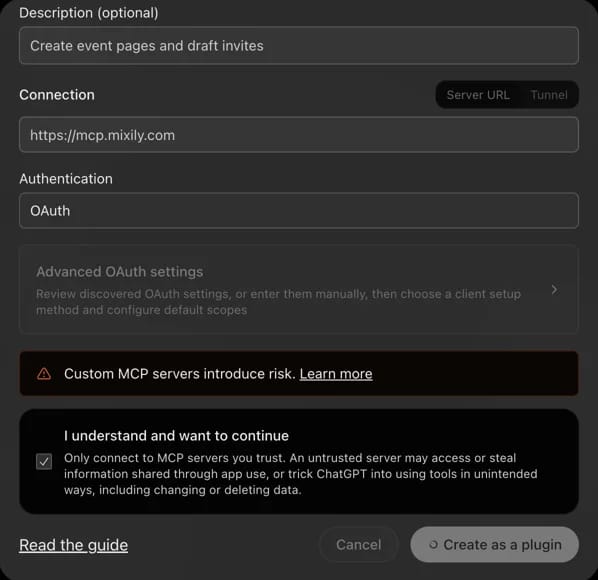
We set this up on ChatGPT Plus, and you don’t need to turn on developer mode. The first time ChatGPT uses Mixily in a chat, it asks your permission. Click Allow once or Always allow.
No connector? The prompts still work. ChatGPT will write the wording, and you paste it into Mixily yourself.
ChatGPT Event Planning Prompts for Parties
1. The milestone birthday
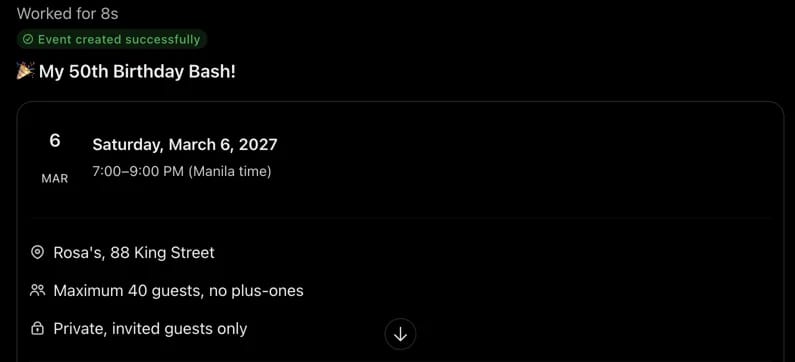
Create a Mixily event for my 50th birthday. Saturday, March 6 at 7pm at Rosa’s, 88 King Street. Write a fun, two-sentence description that says “no gifts, just come.” Cap it at 40 guests and keep it invited-only.
Why it works: it gives ChatGPT everything it needs in one go: date, time, place, tone, size and privacy.
2. The surprise party
Make a private Mixily event called “Shh! Sam’s Surprise 30th.” Friday at 7:30pm at our place. In the description, tell guests to arrive by 7:15 and park around the corner. Don’t invite Sam.
3. The holiday party
Set up our holiday party on Mixily: Friday December 18, 6 to 9pm, at the office. Write a short description that mentions the white elephant gift swap with a $25 limit.
4. Friendsgiving
Create a Friendsgiving event on Mixily for the Saturday before Thanksgiving at 4pm, at my apartment. Ask guests in the description to reply with the dish they’ll bring.
ChatGPT Event Planner Prompts for Work and Clubs
5. The client appreciation night
Create a client appreciation evening on Mixily for next Thursday from 6 to 8pm at The Wine Room. Write a warm, professional description thanking clients for a great year. Then draft invites to everyone from last year’s client event and show me the list before anything is sent.
Realtors and small agencies love this one. Inviting last year’s list is the step that usually takes an evening by hand.
6. The supper club
Make a Mixily event for our supper club: first Sunday of next month, 6pm, at Priya’s. Cap it at 10 seats. Theme is Lebanese night. Invite the same people as our last supper club.
7. The workshop or class
Create a Mixily event for a beginner pottery workshop, Saturday 10am to noon at the studio. Limit it to 12 people and make it public so I can share the link.
Prompts for Gentler Occasions
8. A celebration of life
Create a Mixily event for a celebration of life for my father, Robert. Saturday the 22nd at 2pm at Riverside Community Hall. Write a short, gentle description inviting people to share a memory. Keep the wording simple and warm, not formal.
Mixily works for any gathering: birthdays, baby showers, game nights, and the quieter ones too.
Follow-Up Prompts That Save the Most Time
- “How many people have RSVP’d yes to my birthday so far?”
- “Change the start time to 7:30 and don’t touch anything else.”
- “Take Mark off the invite list before I approve it.”
- “Have my invites gone out yet?”
Can ChatGPT Send My Party Invitations?
It can draft them. It can’t send them without you, and that’s on purpose.
When ChatGPT drafts invites, Mixily emails you a preview of the guest list with an Approve button. Nothing goes out until you click it. Drafting invites is part of every paid Mixily plan. Creating and editing events is free.
Tips for Better ChatGPT Event Planning
give the date, time and place in the first prompt, say “invited guests only” if it’s private, and ask to see the guest list before you approve.
paste in long guest lists. Say “same people as last time” instead. And don’t sweat the wording. ChatGPT is good at that part, so ask it for a funnier or shorter version if you want.
Prefer Claude? Here’s how to use Claude for event planning. The same prompts work there.
Your Next Party, One Prompt Away
Create a free Mixily account and connect it to ChatGPT. Then paste any prompt above.
Set up the AI event planner. Questions? Email [email protected].