Half your guest list hasn’t replied. The party is in eight days. You need a headcount for the pizza order, and you’re wondering how to nudge people without sounding like a debt collector.
Good news: a good RSVP reminder message is short, warm, and makes replying easy. Below are 24 you can copy for texts and emails, sorted by event type, plus subject lines that get opened. At the end I’ll show you how to set Mixily up so the reminders go out on their own and you never have to send one by hand again.
Quick verdict: Send one friendly nudge about a week before the party to people who haven’t replied, and one “see you tomorrow” note the day before to people who said yes. Keep each to two or three sentences with the date and a link to reply. Want it on autopilot? Mixily sends both reminders for you, free →
What Makes a Good RSVP Reminder Message
I’ve hosted hundreds of gatherings. The reminders that work all have the same four parts:
- A warm opener. “Hey!” beats “This is a reminder that…”
- The event and the date. People forget which party you mean, especially in December.
- One clear ask. “Can you let me know by Friday?” Not three questions.
- An easy way to reply. A link, or “just text back yes or no.”
Here’s the fill-in-the-blank version:
Hi [Name]! Still hoping you can make it to [event] on [day, date].
Can you let me know by [deadline] so I can plan food? [Link to RSVP]
And here’s what to skip:
guilt trip. “I really need to know…” makes people dodge you.
send the same nudge three times. One nudge, then a personal text if it really matters.
give a reason. “So I know how much food to get” turns a nag into a favor.
If you want the deeper strategy behind why people don’t reply in the first place, I wrote a whole guide on how to get people to RSVP.
RSVP Reminder Text Examples
Texts get read. Keep them under 160 characters if you can.
1. Casual
Hey! Are you in for game night Saturday? Let me know by Thursday so I can grab enough snacks 🍕
2. Short and sweet
Quick one: can you make it to my place on the 21st? Just need a yes or no!
3. With the link
Hi Jordan! Still hoping you can come to Maya's 30th on Nov 21. RSVP here when you get a sec: [link]
4. Friendly deadline
Final headcount goes to the caterer Friday! Can you let me know if you're coming by then?
5. Low pressure
No pressure at all, but if you can make it Saturday I'd love to save you a seat. Just reply yes or no.
6. For the group chat
Friendly nudge for anyone who hasn't RSVPed for Saturday 🙂 Link's here: [link]. Need numbers by Thursday!
Replying to an RSVP request yourself? That’s the other side of this, and we have 41 RSVP texts and emails for guests.
RSVP Reminder Email Examples
Emails can carry a little more detail. Still keep them short.
7. The classic nudge
Hi there,
Just a quick heads up: we'd love to know if you can make it to [event] on [date]. Can you reply by [deadline]?
Thanks!
[Your name]
8. With a reason
Hi [Name],
I'm putting in the food order on [day], so I'm doing a quick headcount for [event]. Will you be there? Just click Yes or No below.
9. For a work event
Hi team,
A reminder to RSVP for [event] on [date] at [time]. We need final numbers by [deadline] for catering. It takes ten seconds: [link].
10. Warm and personal
Hey [Name],
It wouldn't be the same without you! If you can make it to [event] on [date], let me know by [deadline]. If not, totally understand.
11. Last call
Hi [Name],
Last call for [event]! RSVPs close [deadline]. Hope to see you there.
RSVP Reminder Wording by Event Type
12. Birthday party
Hi! Sam's turning 30 on the 21st and we're doing a backyard party. Can you let me know if you're coming by Wednesday? 🎂
13. Kids’ birthday party
Hi [Parent name]! Just checking whether [child] can make it to Leo's party on Saturday at 2. Need numbers for the goodie bags by Thursday. Thanks!
14. Baby shower
Hi [Name]! We're finalizing plans for Priya's baby shower on [date]. Can you let us know by [deadline] if you'll be there? 💛
15. Bridal shower
Hi! A gentle reminder to RSVP for Hannah's bridal shower on [date]. We need a final count for the brunch by [deadline]. Hope you can come!
16. Wedding
Hi [Name]! Just a friendly reminder that our RSVP deadline is [date]. We'd love to know if you can celebrate with us: [link]
(For the full wedding follow-up timeline, including what to do on deadline day, see what to do when wedding guests don’t RSVP.)
17. Dinner party
Hey! I'm planning the menu for Friday's dinner. Are you in? And any food I should avoid?
18. Housewarming
We finally unpacked! Can you make it to the housewarming on the 21st? Let me know by Thursday so I know how many chairs to borrow.
19. Holiday party
Ho ho, hello! Quick reminder to RSVP for our holiday party on Dec 12. Need numbers by the 5th 🎄
20. Community or club event
Hi everyone! We're capping the next meetup at 25 people. If you're coming on [date], please RSVP here so we can save you a spot: [link]
RSVP Reminder Email Subject Lines
The subject decides if the email gets opened. Short and specific wins.
- `Are you coming? [Event name]`
- `Quick headcount for Saturday`
- `RSVP by Friday: [Event name]`
- `See you tomorrow! [Event name]`
Skip “Reminder” alone and skip all caps. Both read like spam.
When to Send RSVP Reminders
Here’s the schedule I use:
- About 1 week before: one nudge to people who haven’t replied.
- A few days before the deadline: a personal text to anyone who really matters (your best friend, the guest of honor’s mom).
- The day before: a “see you tomorrow” note to everyone who said yes, with the address and time. This one cuts no-shows more than anything else.
That’s it. Two automatic messages plus a few personal texts.
How to Send Automatic RSVP Reminders in Mixily
Writing reminders is the easy part. Remembering to send them in the middle of party prep is the hard part. So let a tool do it.
Every Mixily event comes with two reminders already set up, on every plan, including Free:
- RSVP Nudge (“Are you coming?”), sent 7 days before the event to guests you invited who haven’t replied.
- Day-before Reminder (“See you tomorrow!”), sent 24 hours before to guests who said they’re going.
You don’t have to turn anything on. Here’s how to check them and make them yours.
Step 1: Create your event and set a date
Create your event as usual. The reminders schedule themselves from your start time, so they show up as soon as the event has a date. (If you left the date as TBD or are running a date poll, they’ll say “Not scheduled” until you pick one.)
Step 2: Find the Messages & reminders card
Open your event page. Under Invite & share you’ll see Messages & reminders, with both reminders and the exact date and time each one will go out.
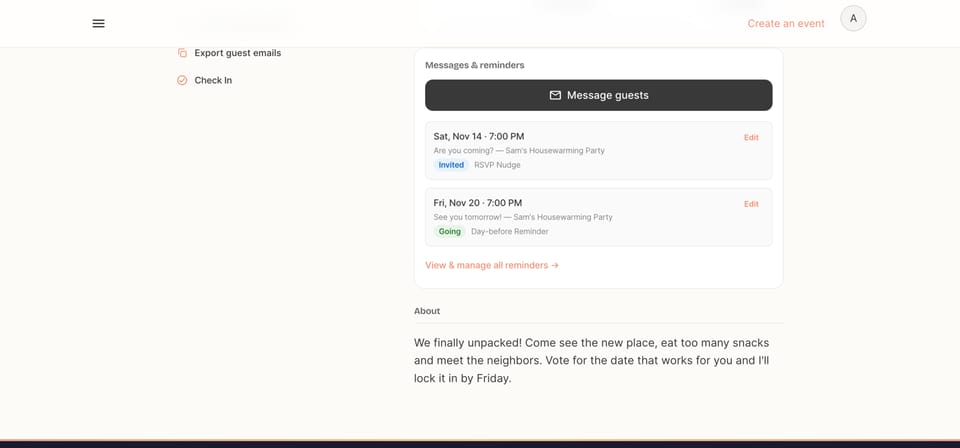
Step 3: Click Edit to change the wording, timing or recipients
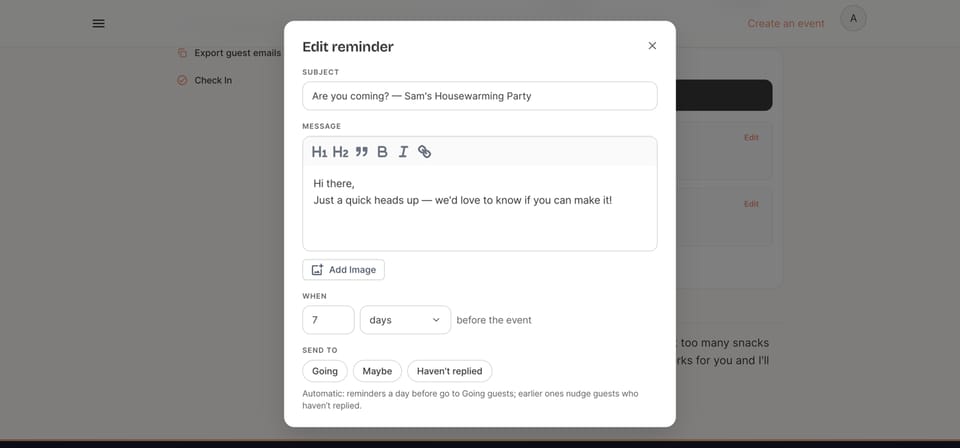
Click Edit on either reminder. You can:
- Rewrite the message. Paste any example from this post. You can add headings, bold, links and even an image.
- Change the timing. Pick any number of minutes, hours or days before the event.
- Choose who gets it. Going, Maybe, Haven’t replied, or a mix. Leave it alone and Mixily uses the sensible default: day-before reminders go to Going guests, earlier ones nudge people who haven’t replied.
- Change the subject line (Lite, Pro and Plus).
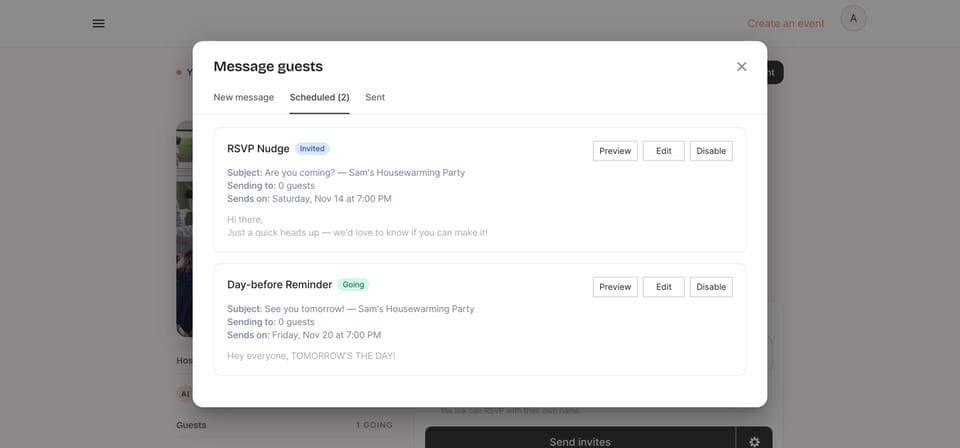
Step 4: Preview it, or pause it
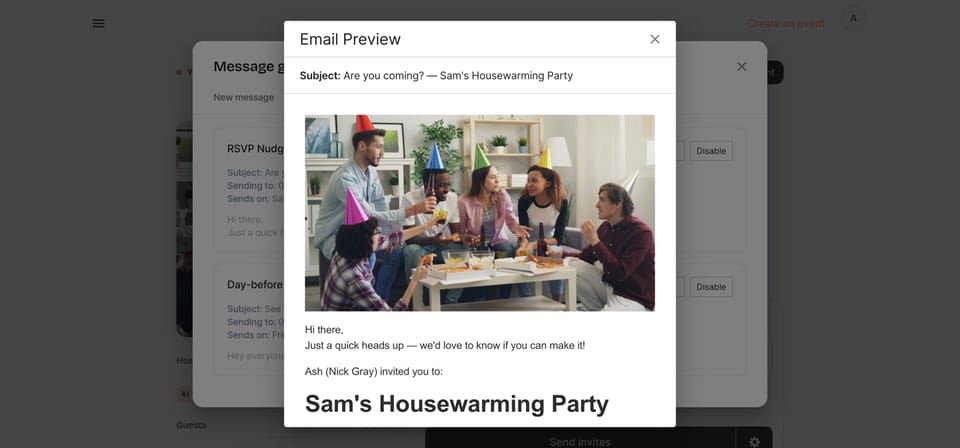
Click View & manage all reminders to see both reminders side by side, how many guests each will reach, and when they’ll send. Preview shows the exact email your guests get. Disable pauses a reminder if you’d rather not send it.
Here’s the part I like best: the reminder email includes the full event details and Yes, No and Maybe buttons, so a guest can RSVP straight from the email, no account needed. That’s the “easy way to reply” from the top of this post, built in.
Need to send something now?
The two reminders are fixed (you can’t add a third or delete one, only edit or pause them). For anything else, like “Parking is on Elm Street” or “We moved inside because of rain,” click Message guests on the same card and email your guests directly.
FAQ About RSVP Reminders
How do you politely remind someone to RSVP?
Lead with warmth, name the event and date, and give one reason you need to know (“so I can order food”). Then make replying easy with a link or “just reply yes or no.” Example #8 above does all of that in two sentences.
How many days before the deadline should I send an RSVP reminder?
Send the first nudge about a week before the event, or 3 to 5 days before your RSVP deadline. That leaves time for a personal follow-up with anyone who still hasn’t answered.
Is it rude to send an RSVP reminder?
No. Most people who don’t reply simply forgot. One friendly reminder is a favor. Three is nagging.
Can I send RSVP reminders by text with Mixily?
No. Mixily reminders go out by email. If someone only reads texts, copy one of the text examples above and send it from your phone.
Do RSVP reminders go to people who already said no?
Not by default. The nudge goes to guests who haven’t replied, and the day-before reminder goes to guests who are going. You can change who gets each one in Edit.
Let the Reminders Send Themselves
You’ve got the wording. Now let it run on autopilot.
Related reading: RSVP response examples
Ready to host your event?
Create your event page on Mixily and two RSVP reminders are scheduled for you, on the free plan too.
Create your free event page →