
You text the group: “When’s everyone free?” Forty messages later, Jordan can only do Sundays, Priya is out the second weekend, and someone just sent a GIF. Nobody has actually picked a date.
There’s a better way to find a date that works for everyone: give people three or four options and let them vote. It takes two minutes to set up, and the answer is right there in a bar chart instead of buried in a group chat.
In this guide I’ll show you how to run a date poll the smart way, and how to do it in Mixily, where the poll and the invitation live on the same page. Once a date wins, your guests get the RSVP automatically.
Quick verdict: Offer 3 or 4 specific date-and-time options, give people 2 or 3 days to vote, then lock in the winner and send the invite. A free Mixily event lets guests vote with just their name, then emails followers an RSVP as soon as you pick the date. Start a free date poll →
Why Group Chats Are Bad at Picking Dates
Here’s the thing: open-ended questions get open-ended answers.
“When works for you?” invites everyone to list their entire calendar. You end up doing the math yourself, scrolling up and down, trying to find the one evening nobody mentioned.
A poll flips it. You do the thinking once (which dates actually work for you), and everyone else just ticks boxes. Two minutes for you, ten seconds for them.
How to Run a Date Poll That Actually Gets a Date
These rules matter more than which tool you use.
Do: offer 3 or 4 options. Two isn’t a choice. Eight is homework.
Do: include the time, not just the day. “Saturday” isn’t an answer if half the group thinks brunch and half thinks dinner.
Do: mix it up. One weeknight, one weekend evening, one weekend afternoon. You’ll learn what your crowd prefers.
Do: let people pick more than one. You want to know every date someone could do, not just their favorite.
Do: set a voting deadline. “I’ll lock it in Friday” keeps the poll from drifting for two weeks.
Don’t: wait for 100% agreement. It almost never happens. Go with the date most people can make, especially if it includes the guest of honor.
Don’t: poll the date and the invite separately. That’s the classic mistake: a Doodle link this week, an invitation next week, and people who voted forget to RSVP. Keep them together.
How to Create a Date Poll in Mixily (Step by Step)
Date polls are free on every Mixily plan. Here’s the whole process.
Step 1: Start a new event and choose “Poll guests”
Go to mixily.com and click Create event. Add a title and cover photo like you normally would. (New to Mixily? Here’s the full guide to creating an event.)
Under When, you’ll see three choices: Start time, Poll guests, and TBD. Click Poll guests.
Step 2: Add your date options
Each option gets a date and a start time. Click Add Option for each one. Remove one with the ×.
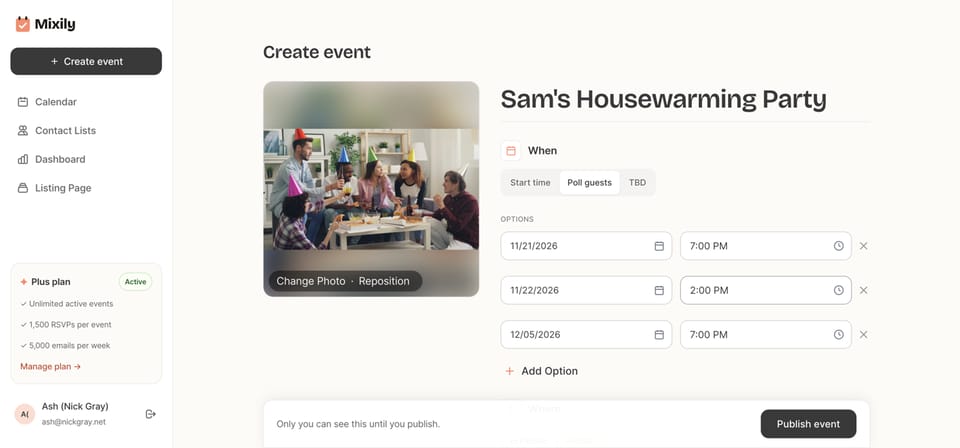
Add your location and a short description. A line like “Vote for the date that works for you and I’ll lock it in by Friday” tells people what to do and when.
Step 3: Publish and share the link
Click Publish event. Your event page now shows the poll instead of a date. Share it however your friends actually communicate: invite people by email from the event page, or click Copy link and drop it in the group chat.
Step 4: Guests vote with just their name
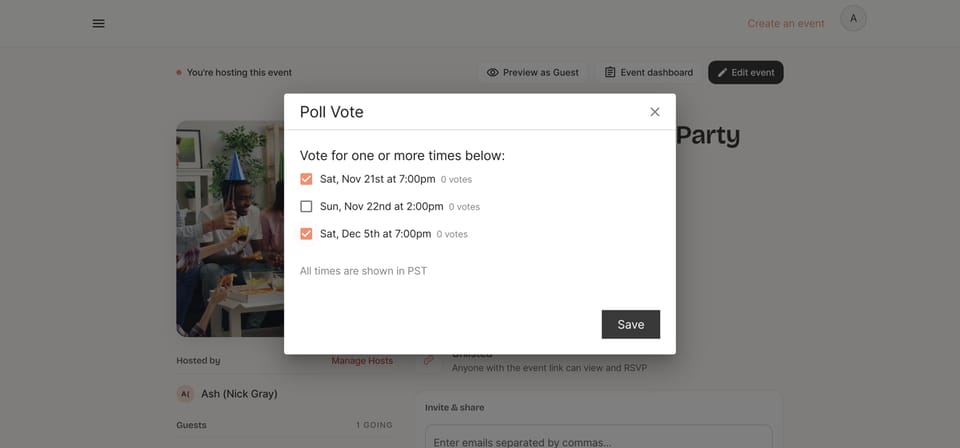
When a guest clicks Vote, they type their name and tick every time that works for them. No account, no email needed to vote.
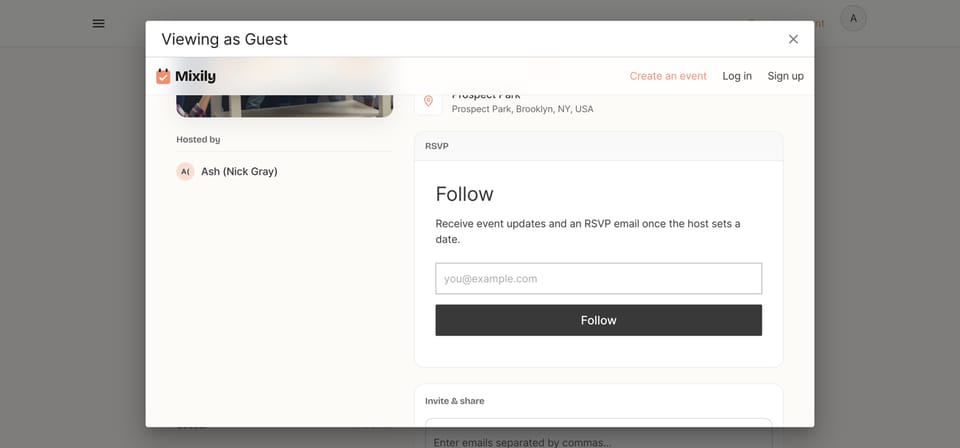
Guests can also Follow the event with their email. Followers get updates and an RSVP email as soon as you set the date, so nobody has to remember to come back and check.
Step 5: Watch the votes come in
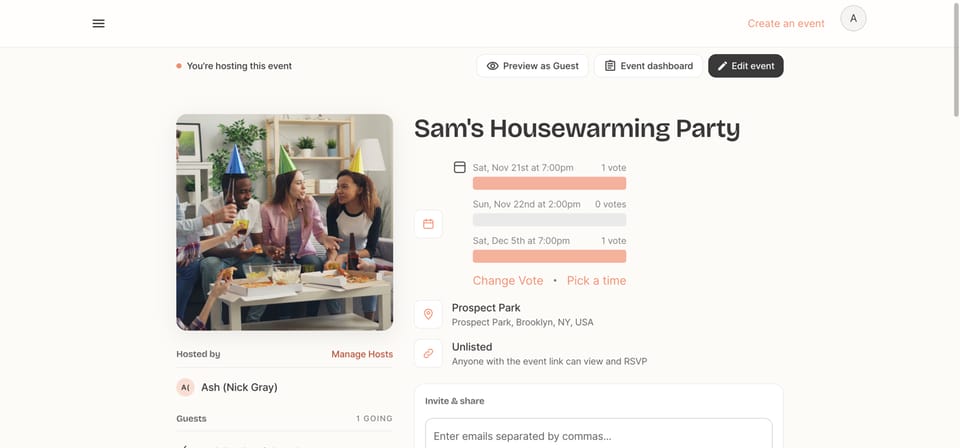
Each option shows a live vote count and a bar, so you can see the front-runner at a glance. You can vote too, and change your vote later with Change Vote.
Step 6: Pick the winning date
When voting’s done, click Pick a time, choose the winner, and hit Save. The poll comes off the page and your event now has a real date and time.
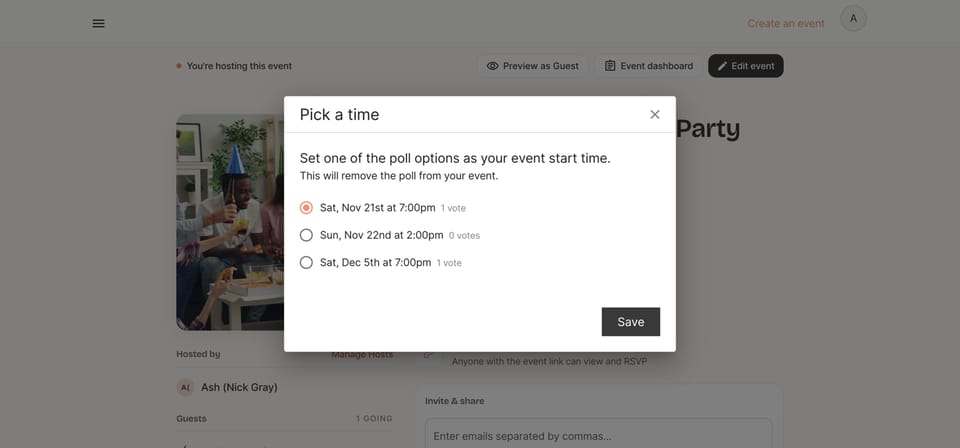
That’s it. Now the event works like any other Mixily event: guests RSVP Going, Maybe or Can’t go, and your two automatic RSVP reminders schedule themselves from the new date.
Not Ready to Poll Yet? Use “Date TBD”
Sometimes you know that you’re hosting but not when. Maybe you’re waiting on a venue, or the guest of honor’s flight.
Choose TBD under When instead. You can publish the page, share the link, and start building buzz now, then add the date later. It’s great for “save the month” announcements.
Date Poll Tools Compared
You’ve got options. Here’s how the popular free tools stack up for picking a party date.
| Tool | Free? | Guests need an account? | Turns into an invite with RSVPs? |
|---|---|---|---|
| Group chat poll (iMessage, WhatsApp) | Yes | No | No |
| Doodle | Free plan | No | No |
| When2meet | Yes | No | No |
| Mixily | Yes, every plan | No | Yes, same page |
Meeting tools like Doodle and When2meet are built for finding a 30-minute slot for a work call, and they’re great at it. For a party, though, you also need the next step: an invitation, RSVPs and reminders. That’s why I like keeping the poll on the event page itself.
FAQ About Finding a Date for a Group
What’s the best way to find a date that works for everyone?
Pick 3 or 4 specific date-and-time options that work for you, share a poll, give people 2 or 3 days, then go with the option most people can make. Don’t try to get everyone; go with the most.
Is there a free Doodle alternative for parties?
Yes. Mixily’s date polls are free on every plan, guests vote without an account, and the winning date turns straight into an event page with RSVPs.
Can guests pick more than one date?
Yes. In Mixily guests can tick every option that works, which gives you a much clearer picture than a single vote.
Do guests need an account to vote?
No. They just type their name. If they want an RSVP email once the date is set, they can add their email to follow the event.
What happens to the votes after I pick a date?
The poll is removed from the page and the event switches to normal RSVPs. People who followed the event get an email to RSVP for the date you picked.
Stop Asking “When Works for Everyone?”
Two minutes of setup beats forty messages. Pick your options, share one link, and let the votes decide.
Related reading: how to plan a party
Ready to host your event?
Create your event page on Mixily: let guests vote on the date, then collect RSVPs on the same page.
Create your free event page →